
How to build a Breadboard dual variable power supply
This breadboard dual variable power supply can be built on a half-size breadboard.
It should be noted that this article is about building a power supply on a breadboard. If you are looking for power supplies for your breadboard experiments then the article you want is Breadboard power supply.
This is a beginner project and if you are a total novice you might want to take a quick read of my guides about how to use a breadboard and breadboard things to be aware of before you roll up your sleeves and get started.
It uses the LM317T and the LM337T positive and negative variable voltage regulators. They have a very wide range and can be set to about 1.5 Volts up to about 37 Volts. In this application, it is wired in such a way as to use one AC input to provide a positive and a negative output. I mainly use them to provide +15 and -15V or +12 and -12V.
Dual supplies are very common for audio circuits particularly where op amps are used so you will find many circuits that require one of these dual supply circuits.
You can set the voltage levels with the preset resistors. For a dual 15 Volts supply you would need an input of about 20 Volts AC. For a dual 12 Volts, you need an AC input of around 15 Volts.

Component list
A Solder-less breadboard, half size will do. Breadboards Kit (5 Pack)
Voltage regulators, an LM317T and heat sink and an LM337T and heat sink.
Capacitors, 2X 2200uF 35V electrolytic capacitors and 2X 10uF 50V electrolytic capacitors.
Resistors, 2X 240R resistors and 2X 5K presets.
Diodes, 2X 1N4007 rectifier diodes.
Wire for making the links.
The breadboard dual variable power supply circuit diagram

There are several ways that the AC voltage can be connected to this type of circuit. The more traditional way is to have a transformer with a central tap so you have three connections. The transformers for this are usually known as 15V-0-15V or 20V-0-20V depending on the voltage.
The zero in the middle shows there is a centre tap. I used a different method in which you only need a single AC input. This is so you can plug an AC adapter into it and not have to worry about connecting a transformer up to the mains. So easier for beginners, note that the adapter has to have an AC output, not the more common DC.
You can pick up an adapter with an AC output from Amazon.
Building the breadboard dual variable power supply
Firstly before you start building this project check the breadboard you have. Some of them have the blue and red strips reversed. If you are following the diagrams make sure your breadboard matches the diagram!
Secondly, note that this project doesn’t have both sides of the red and blue strips linked! To make the layout easier the bottom red strip was used for something else so don’t link the two red strips together.
Thirdly, if you are a beginner you might want to check out my article “Breadboard tips” to help you with the construction. In fact, even if you’re not a beginner you might learn something new.
I start with the wire links first as they are harder to plug in when the larger components are in place.
I find it a lot quicker and easier to pre-form the links and components.
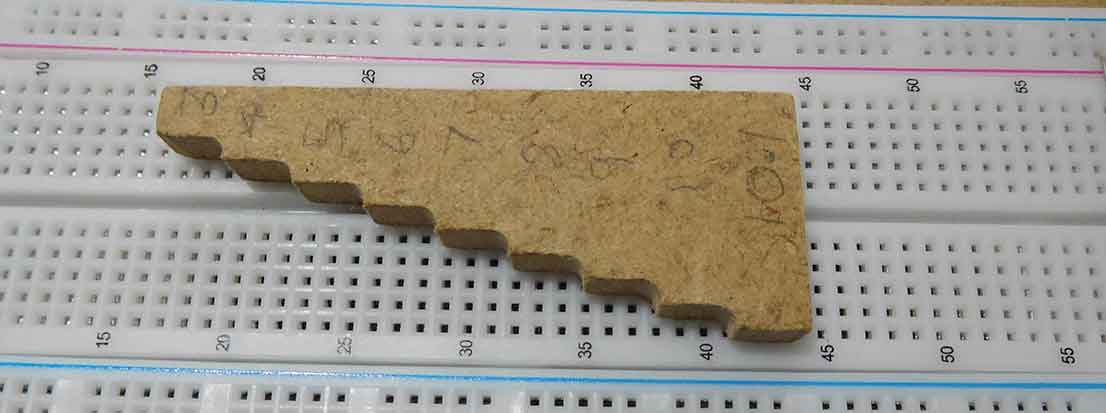
If you want to speed things up I made a little form that you bend the component or wire around then cut off against the edge. This then makes them the correct length and the legs are then around 6mm as that’s how thick the form is.
1. Link blue to blue on the bottom row. Don’t link the two reds!
2. Link 10a to blue.
3. Link a13a to red.
4. Link 11d to 16d.
5. Link 12c to 20c.
6. Link 7e to 7f.
7. Link 19j to red.
8. Link 21j to blue.
9. Link 14g to 18g.
10. Link 10h to 20h.

You should now have ten wire links in place like the picture above. Now you can move on to the components.
Inserting the components
Insert the two diodes making sure you insert them the correct way round.
11. 1N4007 diode 7a to red (band side to red).
12. 1N4007 diode 7i to red (band side to i7).
Insert the two resistors.
13. 240R resistor 16b to 20b.
14. 240R resistor 10i to 14i.

Next the four smaller capacitors. Make sure the two 10uF capacitors are in the correct way round.
15. 100nF capacitor 14j to blue.
16. 100nF capacitor 20a to blue.
17. 10uF capacitor 16a to blue (negative to blue).
18. 10uF capacitor 10j to blue (negative to 10j).

Next insert the two larger capacitors, again making sure they are the correct way round.
19. 220uF capacitor between red bottom corner to blue (negative to blue).
20. 220uF capacitor between red and blue top corner near link (negative to red).

Then the two 5K presets.
21. 5K preset 9b, 10b and 11b.
22. 5K preset 20i, 21i and 22i.
Finally insert the voltage regulators, making sure you identify the correct one and put it in the correct way round.
23. LM317T pin 1 to 11e, pin 2 to 12e and pin 3 to 13e.
24. LM337T pin 1 to 20f, pin 2 to 19f and pin 3 to 18f.

The AC input to the breadboard
The maximum AC you can connect to the input is around 40 Volts, anything more and you will destroy the voltage regulators. I use heat sinks on the regulators. What you actually connect depends on what voltage you want. I’ve got a mains adapter plugged in that gives around 15 Volts AC output and that is enough to provide the +12V and -12V that I need. Connect The AC supply between blue and g7.
Voltage outputs
The outputs are 0V blue, the negative is from 18j and the positive is from 20d.

Final thoughts on the breadboard dual variable power supply
If you can find an AC output adapter to power this circuit you won’t need to connect up a transformer so you can avoid mains wiring if you are a beginner.
This circuit can be built very cheaply but will provide a very useful circuit. This is a power supply I often use in designs that call for a dual rail power supply because of its simplicity.
I’ve used it in my “breadboard synthesizer” project. Finally, if you have built this circuit and can’t get it working check out my article about Common breadboard mistakes to find out where you might have gone wrong.

Hopefully, you’ve got this project working and if you want to use it in the future, it would be a good idea to transfer it to a soldered board. This guide, transferring a breadboard circuit to a circuit board, contains tips to help with that task.
Further articles that you may find helpful are How do breadboards work? and How are breadboards connected?
Also check out my post, Breadboards – the complete guide, for everything you need to know about breadboards.

“Hi, I’m Graham Moore and I’ve been building electronic projects since I was 12. I had a fascination for old radios and taking them to pieces but when my Nan bought me an electric soldering iron, I realised with a few components I could build stuff.
Learning to solder opened up many doors for me as electronics also became a career. I hope you get as much from it as i did”.
Breadboard design software

Breadboard design software tested and compared If you use breadboards, you might find breadboard design software helps with your building. Breadboards are tremendously useful for beginners who can’t solder…
Breadboard vs stripboard

Breadboard vs stripboard Which is the best method for building prototype circuits? Breadboard vs stripboard, which is better? In this article, I’ll explain the advantages and disadvantages of each method….
Best breadboard kit buyers guide

Best breadboard kit buyers guide In this “Best breadboard kit buyers guide”, I’ll attempt to point you in the direction of the kit that best suits you. Breadboard kits come…
How are breadboards connected?

How are breadboards connected? Breadboards vary in type so how they are connected depends on the type of breadboard. Breadboards can be further divided into two main types and that’s…
How do breadboards work?

How do breadboards work? Before you can answer the question how do breadboards work, you need to know exactly what a breadboard is. Firstly, there are various types of breadboards…