

Add power to a USB hub
It’s possible to add power to an unpowered USB hub.
All you need is an unpowered hub, a 5-volt power supply and to be able to solder. If you can’t solder then it’s not difficult to learn and all the information you need is in the how to learn to solder for beginners.

Why add power to a USB hub
If you’ve had any problems with USB hubs in the past, it may have been a power issue.
USB sockets supply different amounts of power depending on which type it is. A USB 3 can supply more power than a USB 2. A USB 2 will supply more than the original first incarnation of USB (if you can still find any!) So if your USB device needs more than the USB socket can provide you will have a problem.
This could be the device not working or not being recognised or the system crashing. Whatever it is it won’t be good! I first encountered this problem with a Raspberry Pi project. This project was a network drive using the Raspberry Pi running OpenMediaVault. It was all working extremely well until I switched from using USB pen drives to a USB hard drive.

The picture above shows the Raspberry PI project that wouldn’t see the USB hard drive.
The system just wouldn’t see the new drive! After a bit of research, I came to the conclusion that I needed a powered USB hub to connect the drive to and then plug that into the Raspberry PI.
Why not buy a powered USB Hub
You can of course buy a powered USB hub. Amazon have plenty of them and they won’t break the bank.
The thing was I had an unpowered hub doing nothing and I wanted to experiment!
How does it all work?
If you take an unpowered USB hub apart you’ll see that the two outside pins are for 0V and 5V.


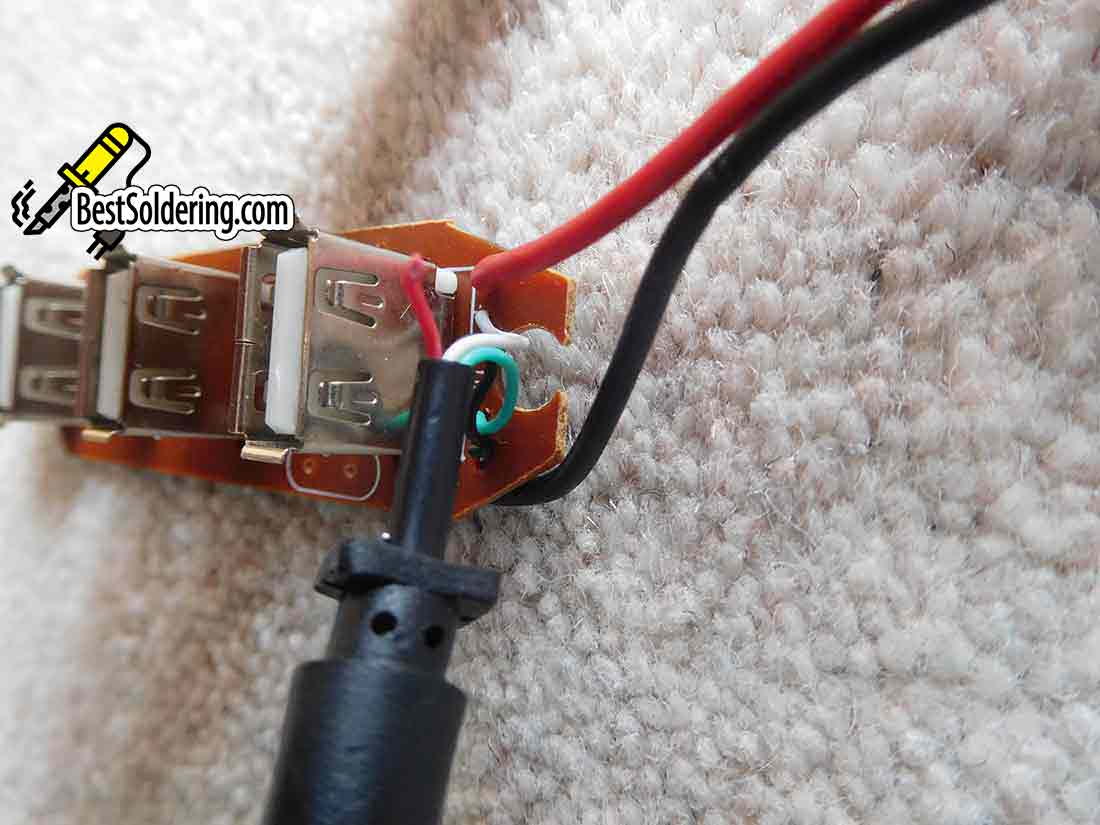
They will usually be a red and a black cable going from the socket side and soldered into the board. What you want to do is take out the red lead from the board. This will stop the 5V supply from being taken from whatever it is plugged into. Usually a computer.

Now the hub won’t work at all because whatever is plugged into it won’t be getting any power supplied to it.
Using a 5V power supply
What you need to do is get a 5V power supply and connect it to the hub.
You do this by connecting the 0V up to the board. This should be easy enough to find as it will be where the black cable from the USB plug connects. You now connect the 5V from the supply to where you disconnected the red cable from.

Make sure that the original red lead doesn’t come into contact with anything. You can do this by cutting off the bare exposed wire and putting a bit of insulating tape over it and bending it back on itself.
Using a bench power supply
Before I did this I used my bench power supply. I’ve mentioned before how useful bench power supplies are.
Firstly, if you have a decent one you can limit the current they supply. If you don’t know why this is a good thing, it’s because a bench power supply can supply plenty of current and if you wire something wrong, all that current could easily burn a circuit out. Also, If you know roughly what current your circuit should use you can set it.
If you don’t you can set it very low and increase it until your circuit works or you realise you’ve made a wiring error! Check out my article on why a bench power supply makes sense for an electronics hobbyist.
Another good thing about a bench power supply is that a good one will tell you how much current it’s supplying. This was something I wanted to check out. When I connected it up and plugged the hard drive in it was using .25A. This was about what I had expected.
Making it all working and tidy
After I’d played around and verified that my set-up was working how I wanted it to, I needed to make it more practical.
I needed my hub to just power a hard drive to get it to work with my Raspberry Pi network drive project. By using my bench power supply I’d found that I needed a 5V power supply that would provide around .5A. This would mean it wasn’t running at its limit, which is never a good idea in electronics.

The easiest way to make it all usable is to keep the HUB in its old case and just fit a small socket on the case. You can even match it up to the one on your power supply if you get one of the wall-type adapters. This will probably be a 2.1mm or a 2.5mm socket.

The picture shows the powered USB HUB before I fitted the power socket. You could just use it like this with the powered leads coming out through a hole in the case.
Make sure that the 5V supply is regulated and stable as you don’t want it to damage any expensive USB devices that it powers.
Final thoughts

This was just a simple project to confirm that it’s quite easy to wire up a 5V power supply to an unpowered USB hub.
It was also a good way to use up what I already had without buying anything else.